sweetcell
Joined: July 18, 2006 at 05:01 AM UTC
Posts: 22608
the human/computer interface thread (monitors, desktop setup, etc.)
June 30, 2017 at 07:29 PM UTC
#
since a good number of spend our daze starring at computers, this is a thread to discuss (and kvetch about) our interface to the digital world…
Side-majeure wrote:
excontradiction wrote:
I have my desktop monitor in portrait mode. I will always work this way.
when I managed the service desk, there was always a very long list of open items
I always had one 27inch monitor in portrait mode as I could see like 50 open issues on one page (vs 15 in landscape)
but I am fond of landscape for everything else
i have two side-by-side monitors, both in landscape and horizontally aligned (left and right screen, with the left screen . i'm often comparing email, spreadsheet, and a browser or three. portrait would not work for me, but that's probably in large part due to habit.
much to julian's dismay, i belong to the cult of the taskbar-on-top. yes, my start menu is at the upper left. i couldn't imagine working any other way. this puts all my menus - both application and system - in one area. none of this "click the taskbar at the bottom to switch to program, mouse to top of screen to select program menu, click at bottom of screen to switch back to other program…". mind you i do a lot of that with keystrokes anyways, but when i do need a menu i don't want to be mousing back and forth all over the screen. <cue up jules' vapors>
hutch
Joined: Unknown
Posts: 0
Re: the human/computer interface thread (monitors, desktop setup, etc.)
June 30, 2017 at 07:30 PM UTC
#
I am looking at two monitors at the present time.. both connected to my computer.. this way i can turn my head to the right and still see what is being typed immediately in front of me.. its weird.
sweetcell
Joined: July 18, 2006 at 05:01 AM UTC
Posts: 22608
Re: the human/computer interface thread (monitors, desktop setup, etc.)
June 30, 2017 at 07:31 PM UTC
#
Yes, wrote:
Side-majeure wrote:
excontradiction wrote:
I have my desktop monitor in portrait mode. I will always work this way.
when I managed the service desk, there was always a very long list of open items
I always had one 27inch monitor in portrait mode as I could see like 50 open issues on one page (vs 15 in landscape)
but I am fond of landscape for everything else
I have always positioned them in landscape but now that I'm reading this, the rightmost of my three I'm considering putting portrait mode because I have something I'm in and out of all day that'd display perfectly in portrait.
3 monitors?
always trying to one-up us…
Yada
Joined: February 05, 2003 at 06:01 AM UTC
Posts: 12418
Re: the human/computer interface thread (monitors, desktop setup, etc.)
June 30, 2017 at 08:01 PM UTC
#
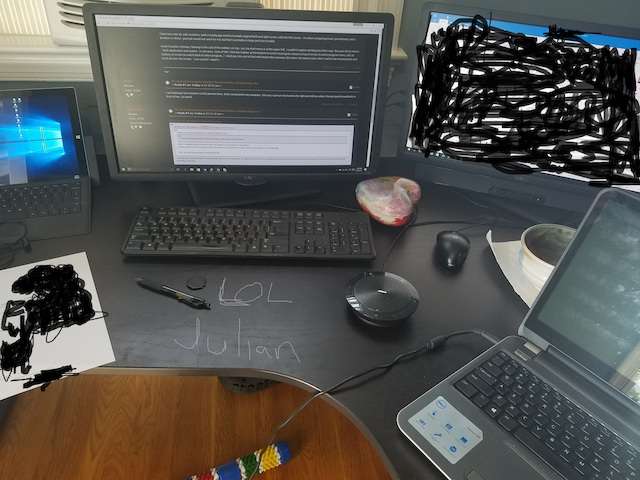
Spotify Monitor
4-Um Monitor
Email Monitor
Separate computer for atomic account
jrpa
Joined: September 03, 2013 at 03:15 PM UTC
Posts: 29999
Re: the human/computer interface thread (monitors, desktop setup, etc.)
June 30, 2017 at 08:22 PM UTC
#
Yada wrote:
Spotify Monitor
4-Um Monitor
Email Monitor
Separate computer for atomic account
Unless your mouse can cross from screen to screen across all four, this is just clutter and I award you no points.
Yada
Joined: February 05, 2003 at 06:01 AM UTC
Posts: 12418
Re: the human/computer interface thread (monitors, desktop setup, etc.)
June 30, 2017 at 08:24 PM UTC
#
Yes, wrote:
Yada wrote:
Spotify Monitor
4-Um Monitor
Email Monitor
Separate computer for atomic account
Unless your mouse can cross from screen to screen across all four, this is just clutter and I award you no points.
Pfffft…come on now Jules, the first three are tied together minus the atomic computer.
jrpa
Joined: September 03, 2013 at 03:15 PM UTC
Posts: 29999
Re: the human/computer interface thread (monitors, desktop setup, etc.)
June 30, 2017 at 08:24 PM UTC
#
sweetcell wrote:
much to julian's dismay, i belong to the cult of the taskbar-on-top. yes, my start menu is at the upper left. i couldn't imagine working any other way. this puts all my menus - both application and system - in one area. none of this "click the taskbar at the bottom to switch to program, mouse to top of screen to select program menu, click at bottom of screen to switch back to other program…". mind you i do a lot of that with keystrokes anyways, but when i do need a menu i don't want to be mousing back and forth all over the screen. <cue up jules' vapors>
All joking aside, this chills me to the bone and makes me question our friendship you sick freak.
sweetcell wrote:
3 monitors?
One for Outlook, one for monitoring the IT ticketing system, one for general RDP/whatever I'm actually doing.
jrpa
Joined: September 03, 2013 at 03:15 PM UTC
Posts: 29999
Re: the human/computer interface thread (monitors, desktop setup, etc.)
June 30, 2017 at 08:26 PM UTC
#
Yada wrote:
Pfffft…come on now Jules, the first three are tied together minus the atomic computer.
Then you have three monitors and a spare ass laptop. I can pull my laptop out too and set it near my desktop, it doesn't make it 4 monitors; its two systems.
Yada
Joined: February 05, 2003 at 06:01 AM UTC
Posts: 12418
Re: the human/computer interface thread (monitors, desktop setup, etc.)
June 30, 2017 at 08:30 PM UTC
#
Yes, wrote:
Yada wrote:
Pfffft…come on now Jules, the first three are tied together minus the atomic computer.
Then you have three monitors and a spare ass laptop. I can pull my laptop out too and set it near my desktop, it doesn't make it 4 monitors; its two systems.
I never said it wasn't a separate system…
jrpa
Joined: September 03, 2013 at 03:15 PM UTC
Posts: 29999
Re: the human/computer interface thread (monitors, desktop setup, etc.)
June 30, 2017 at 08:33 PM UTC
#
Yada wrote:
Yes, wrote:
Yada wrote:
Pfffft…come on now Jules, the first three are tied together minus the atomic computer.
Then you have three monitors and a spare ass laptop. I can pull my laptop out too and set it near my desktop, it doesn't make it 4 monitors; its two systems.
I never said it wasn't a separate system…
OK, I have two more unplugged monitors in my office's closet. Do I have five monitors?
Yada
Joined: February 05, 2003 at 06:01 AM UTC
Posts: 12418
Re: the human/computer interface thread (monitors, desktop setup, etc.)
June 30, 2017 at 08:36 PM UTC
#
Yes, wrote:
Yada wrote:
Yes, wrote:
Yada wrote:
Pfffft…come on now Jules, the first three are tied together minus the atomic computer.
Then you have three monitors and a spare ass laptop. I can pull my laptop out too and set it near my desktop, it doesn't make it 4 monitors; its two systems.
I never said it wasn't a separate system…
OK, I have two more unplugged monitors in my office's closet. Do I have five monitors?
"since a good number of spend our daze starring at computers, this is a thread to discuss (and kvetch about) our interface to the digital world…"
As of today, this is my set up… brah. 99% of the time, I don't have that spare.
beetsnotbeats
Joined: April 26, 2002 at 05:01 AM UTC
Posts: 5756
Re: the human/computer interface thread (monitors, desktop setup, etc.)
June 30, 2017 at 11:19 PM UTC
#

Maybe these guys can weigh in on this.
grateful
Joined: October 15, 2008 at 05:01 AM UTC
Posts: 11564
Re: the human/computer interface thread (monitors, desktop setup, etc.)
July 01, 2017 at 03:18 PM UTC
#
My second monitor is a ceiling mounted projector + a 96-inch screen.
grateful
Joined: October 15, 2008 at 05:01 AM UTC
Posts: 11564
Re: the human/computer interface thread (monitors, desktop setup, etc.)
July 03, 2017 at 03:20 PM UTC
#
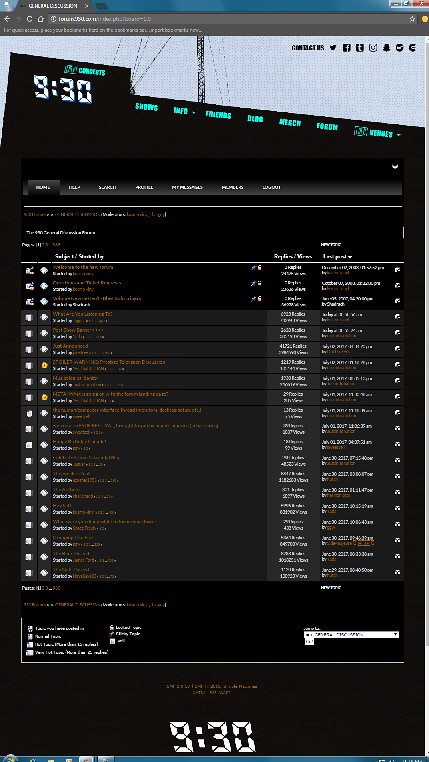
Forum view on a portrait monitor…
vansmack
Joined: October 04, 2001 at 05:01 AM UTC
Posts: 19725
Re: the human/computer interface thread (monitors, desktop setup, etc.)
July 03, 2017 at 04:48 PM UTC
#
In the office, I keep the Surface closed, connected to two 21 inch monitors, both landscape, one of which is a touchscreen to get around the aforementioned mouse issue that presents itself when I use the 42 inch television in my office to stream sports/major news stories. The TV, across the room, is connected to the same Surface via a Microsoft Wireless Display Adapter.
Monitor 1 is mostly Word Processing/Excel with a taskbar across the bottom because I am not a heathen. Monitor 2 is the touchscreen with no taskbar and is essentially only a web browser (a browser is really the only thing touch optimized in Windows 10). And the TV is only a web browser for MLB.TV and YouTube TV. I left the taskbar on that screen but it disappears as I watch most TV in full screen anyway.
Sidehatch
Joined: October 04, 2011 at 04:33 AM UTC
Posts: 25687
Re: the human/computer interface thread (monitors, desktop setup, etc.)
July 03, 2017 at 07:52 PM UTC
#
vansmack wrote:
the Surface
Thinking this might be my new rig
I think there isn't much of a value of the 5 pro tho
you can get a 4pro 8 gig i5 256 ssd for a good deal now
with a taskbar across the bottom because I am not a heathen.
I would expect no less
Kemosabe
Joined: Unknown
Posts: 0
Re: the human/computer interface thread (monitors, desktop setup, etc.)
July 03, 2017 at 08:18 PM UTC
#
I thought we were in some kind of "golden age" around here. Other than me returning and the block feature, there is not much happening.
herman otto
Joined: Unknown
Posts: 0
Re: the human/computer interface thread (monitors, desktop setup, etc.)
July 03, 2017 at 10:20 PM UTC
#
Dude, what are you talking about? This is some middle-aged man prime nerd s***right here.
hutch
Joined: Unknown
Posts: 0
Re: the human/computer interface thread (monitors, desktop setup, etc.)
July 03, 2017 at 10:30 PM UTC
#
I have to be honest.. there aren't that many people that post here and when they start ignoring or blocking the few other people that post.. that ain't going to lead to no golden age.. in fact just the opposite..
but its also true that its the fourth of july week and people are on vacations…..
I also have to say most of the "content" Julian creates is a bore.. his Walrus joke is beyond old